

idea
The idea was to create an interactive website that allows the viewer to cut out certain parts of an image like a hole puncher for example to create negative space.

figma
In order to have the most control with the design aspect of this project I created a layout in Figma with an interaction example set out. Surprisingly, bolt had a hard time recreating the layout exactly which was a hassle to correct.

Bolt
When using bolt I found that simple and direct prompts worked the best. Creating detailed and intricate prompts that tackled each problem at once were less successful. Bolt also uses a credit system so keep in budget was interesting.

THE SETUP.
Bolt as a user friendly interface which acts like chatgpt where you put in prompts and it will respond. In this case it will create an interactive website that best replicate what you are asking for. There are prompts on the left and the workspace on the right.

Click and create
I always loved design that explore positive and negative space and having that contrast. I wanted to create a game where you could cut out certain parts of an image and paste them creating a collage of your own.

bolt website
ai website builder
Using bolt to create a website that highlights positive and negative design principle.
software: Bolt + figma

first prompt
I would like the viewer to be able to interact with imagery by clicking and dragging cut outs of an image and dropping it in the canvas.
Reference the Figma layout and remember the naming conventions for each grouped item.
The right side of the composition has buttons for the user to interact with. There are cutter buttons that allow the user to use Star button, Square button and circle button to change the shape of the sun outs. There is a scale and rotation button that allows them to change the shape accordingly.
When the user clicks a cutter button have it hover with the mouse. When they click on the image the cutter with pick up a section of the image and hold it. The user with move their mouse to the canvas and drop it. Once a piece is taken from the image there will be white space left in its place.
Refer to example interaction to see how this will visually look. Do not have example interaction as the static state of this interaction. Static state of interaction will have a clean canvas and a full image.
There will be images 1-9 that the viewer can select and cycle through. When a new image is selected the image will change but the cut outs in canvas will stay the same. They will be able to mix any cutouts from any images and store that unit they press the reset button.
There is a reset button and a save button. Users will be able to save the canvas and Image box to their computers.
response
I have a few clarifying questions to better understand your vision:
Image Cutter Mechanics:
-
When a cutter button is selected and hovering with the mouse, should the user see a preview outline of the shape before clicking on the image?
-
What size should the cutouts be? Fixed size, or should the scale slider affect the size before cutting?
-
Should the rotation slider affect the cutout angle before it's placed, or only after it's on the canvas?
Canvas Interaction:
4. After cutouts are placed on the canvas, can users move them around, or are they fixed once dropped?
5. Can users adjust the scale/rotation of cutouts that are already on the canvas, or only during the cutting/placing process?
6. Is there a limit to how many cutouts can be on the canvas at once?
Image Selection:
7. You mentioned images 1-9, but I see images 1-4 in the public folder. Should I create placeholder spots for images 5-9, or work with 1-4 for now?
8. How should users cycle through images? Arrow buttons, thumbnail gallery, or another method?
Visual Feedback:
9. When white space appears where an image was cut, should it be pure white or show a transparent/checkered pattern?
10. Should there be any visual indication showing which cutter shape is currently selected?
Save Functionality: 11. Should the save feature export just a screenshot/image file, or do you also want the ability to save and reload the entire composition state (so users can continue editing later)?
what was wrong?
There wasn't enough enough clarification on many things in the prompt which bolt made sure I clarify before implementing changes.
Solution
I found that using prompts that were shorter tackling one issue at a time worked better. I also found that using simpler language helped Bolt figure out what it needed to do.
errors
I experienced some difficulties with dimension, the symbols and the interaction itself.
Incorrect image ratio
I noticed that when I was cutting images out at first it was not accurate. So I had to readjust the dimensions for images on the canvas.

intended
Layout

Bolt iterations


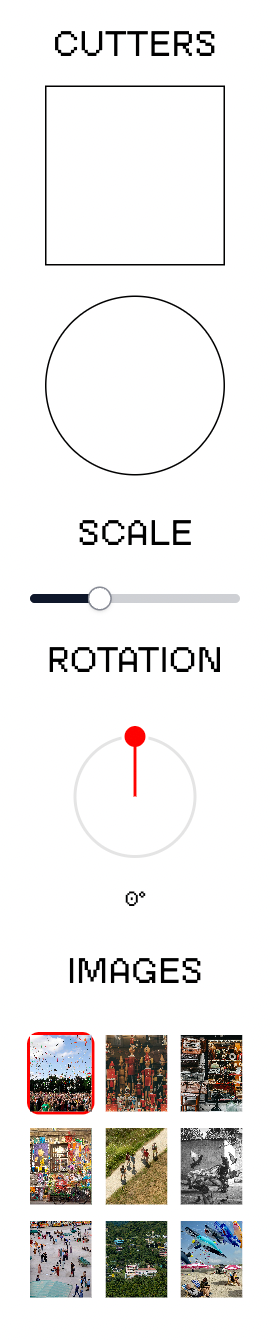
Interface
Bolt couldn't recognize a star shape properly so I decided to get rid of it. In the code I noticed some inconsistencies which led me to believe that it would be unable to scale the star up to my desired scale.
Final interaction
You see here in the interaction the responsiveness with each cut out is great. Feel free to check it out!!
thoughts?
It was interesting using AI to create a website. However, I found myself getting frustrated with the lack of intuition AI has. It can replicate something it's seen before but when you try to control it and give it direction to something specific it acts up. I think I would rather use Rive or another application that allows me to be more hands on. It's more difficult but it's more rewarding.